Tutorial 2: Image Plane Positions
:::info Migrated from Old Wiki This tutorial has been enhanced with content from the old GLEE wiki. Content should be double-checked for accuracy. :::
In Tutorial 1, we created a model that fits well to the source plane positions. While this provides a strong starting model, it can introduce issues like the over- or under-prediction of images.
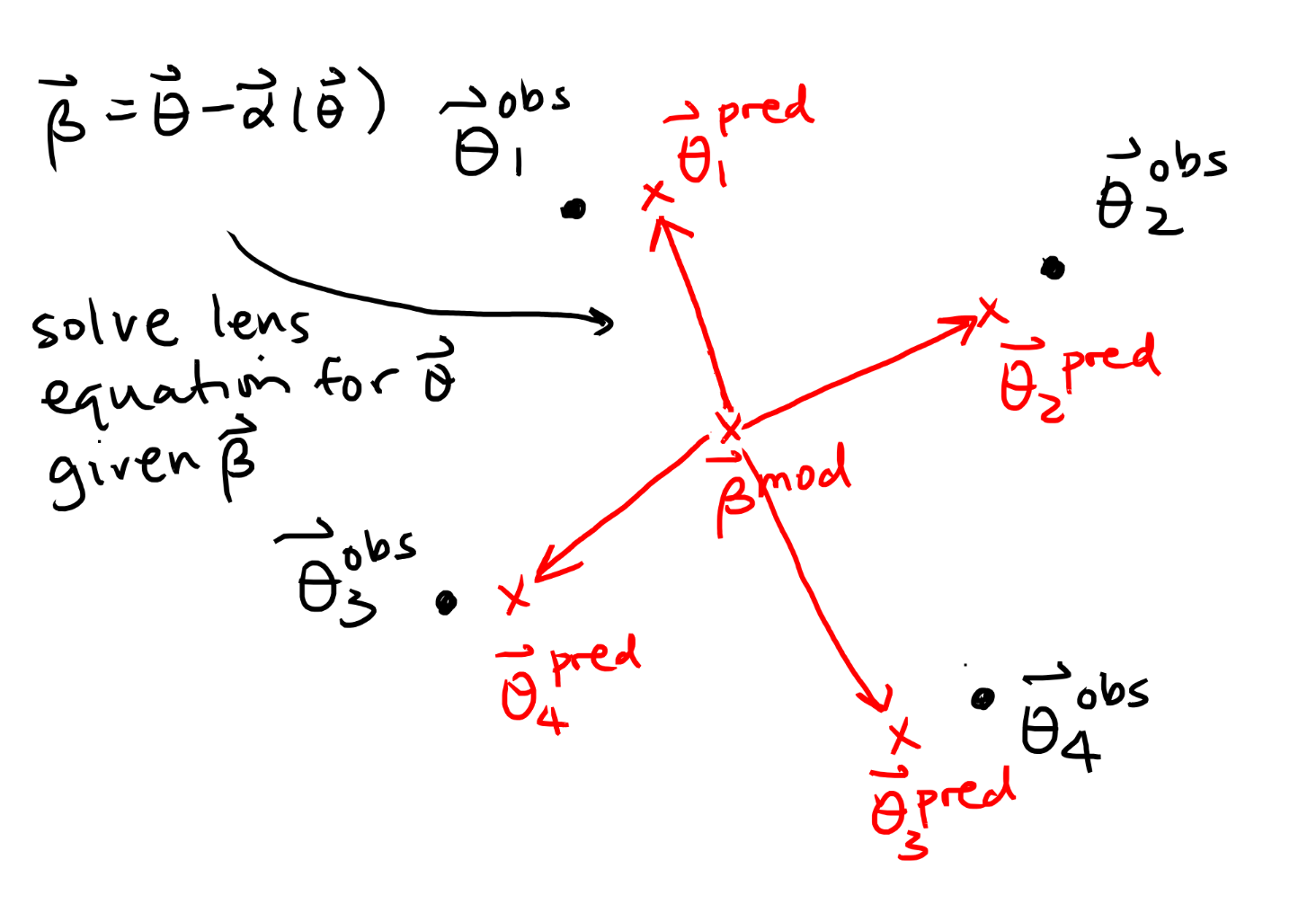
Our next step is to optimise the model in the image plane. This produces a more realistic, robust model that accurately predicts the correct number of images.
Where:
- is the observed position of the -th quasar image (obtained by fitting a PSF light profile to the observed images).
- is the predicted position of the -th quasar image.
- is the image multiplicity (e.g., 4 for a quad).
- are the mass model parameters.
- is the positional uncertainty.
Why Image Plane?
Source-plane modelling is computationally cheap but has a subtle bias: it can produce models that predict the wrong number of images (e.g., 5 images for a quad system) because it does not check whether the model actually reproduces the observed image multiplicity. Image-plane modelling avoids this by comparing model-predicted image positions directly to observations, enforcing the correct image geometry.
Step 1: Update the Config File
To switch to image plane modelling, update the chi2type in the global parameters of your config file:
chi2type 2
Everything else in the config (lens parameters, source positions, step sizes) can remain the same as the best-fit result from Tutorial 1.
:::tip Starting point
Use the best-fit config file from Tutorial 1 (output of the last siman run) as your starting point for Tutorial 2. This ensures you begin close to a good model and avoid long initial optimisation.
:::
Step 2: Siman/MCMC Cycle
Repeat the same optimisation cycle as in Tutorial 1:
-
Run simulated annealing to find the best-fit parameters:
glee.py minimise -o configfile_img2 configfile_img -
Check
img_chi2(image-plane chi-squared):glee.py chi2 -c img -- configfile_img2 -
Run MCMC to sample the posterior:
glee.py -v 1 mcmc configfile_img2 -
Save the best-fit iteration as a new config and update the covariance matrix.
-
Repeat until
img_chi2is thoroughly stable and minimised.
:::note Convergence
A well-converged image-plane model should have img_chi2 / dof close to 1 and stable MCMC chains with an acceptance rate near 25%.
:::
Step 3: Verify the Solution
Use glee.py analyse to compare predicted and observed image positions:
glee.py analyse configfile_img2
This prints the predicted image positions alongside the observed ones, letting you check residuals directly. Once the model is converged, proceed to Tutorial 3 to add surface brightness fitting.
Advanced: Parameter Linking
As your models become more complex (e.g., multiple lens components, light + mass), you may want to link parameters between different components to enforce physical constraints or reduce model degeneracy.
Syntax
Use label: to name a parameter, then link: to tie another parameter to it:
lenses_vary 2
    piemd
    4.000000  #x-coord   flat:3.8,4.2   step:0.05  label:lens_x
    4.000000  #y-coord   flat:3.8,4.2   step:0.05  label:lens_y
    # ... other parameters

    shear
    0.050000  #magnitude  flat:0,0.3     step:0.01
    1.200000  #theta      link:mass_pa   a:0,1,1
The a:a1,a2,a3 Coefficients
The link: syntax follows the transformation:
Common Use Cases:
| Use Case | a: values | Formula | Example |
|---|---|---|---|
| Identity (same value) | a:0,1,1 | Shear PA = lens PA | |
| Offset | a:0.5,1,1 | Secondary lens offset from primary | |
| Scale | a:0,0.5,1 | Core radius proportional to Einstein radius | |
| Opposite sign | a:0,-1,1 | Mirror across axis | |
| Quadratic | a:0,1,2 | Non-linear relationships |
Example: Mass-Follows-Light
Force a mass profile center to track a light profile center:
lights_vary 1
    sersic
    4.000000  #x-coord   flat:3.8,4.2   step:0.05  label:gal_x
    4.000000  #y-coord   flat:3.8,4.2   step:0.05  label:gal_y
    # ... other Sérsic parameters

lenses_vary 1
    piemd
    4.000000  #x-coord   link:gal_x     a:0,1,1
    4.000000  #y-coord   link:gal_y     a:0,1,1
    # ... other PIEMD parameters
Now the PIEMD mass centroid will always match the Sérsic light centroid, reducing free parameters from N+2 to N.
Example: Align Shear with Lens PA
Constrain external shear to be aligned with the lens major axis:
lenses_vary 2
    spemd
    4.000000  #x-coord   flat:3.8,4.2   step:0.05
    4.000000  #y-coord   flat:3.8,4.2   step:0.05
    0.700000  #b/a       flat:0.5,1.0   step:0.05
    1.500000  #theta     flat:0,6.28    step:0.1   label:mass_pa
    0.800000  #theta_e   flat:0.5,3.0   scale:     step:0.05

    shear
    0.050000  #magnitude  flat:0,0.3     step:0.01
    1.500000  #theta      link:mass_pa   a:0,1,1
Now the shear orientation will track the SPEMD orientation.
Nested Linking
You can link parameters in chains: x → y → z
:::caution Order Matters! GLEE updates non-linked parameters first, then applies links in the order they appear in the config file.
Case I (recommended):
x    label:L1
y    link:L1    label:L2
z    link:L2
Result: z gets the updated value of y (which is updated from x)
Case II (problematic):
x    label:L1
z    link:L2
y    link:L1    label:L2
Result: z gets the old value of y (before it was updated from x)
Best practice: Declare links in dependency order (base parameters first, derived parameters last). :::
When to Use Linking
- Reducing degeneracies: When mass and light are expected to trace each other
- Enforcing symmetry: When components should share a PA or axis ratio
- Multiplane lensing: Link higher-redshift lens positions to their source positions (see Tutorial 5)
- Physical priors: When two parameters are expected to correlate (e.g., core radius ~ Einstein radius)
:::tip Performance Boost Linking reduces the effective number of free parameters, speeding up MCMC convergence and reducing parameter space volume. :::