Tutorial 1: Source Plane Positions
:::info Migrated from Old Wiki This tutorial has been enhanced with content from the old GLEE wiki. Content should be double-checked for accuracy. :::
:::tip Prerequisite Before you start, make sure you have familiarised yourself with the structure of the GLEE Configfile and glee.py. :::
Introduction
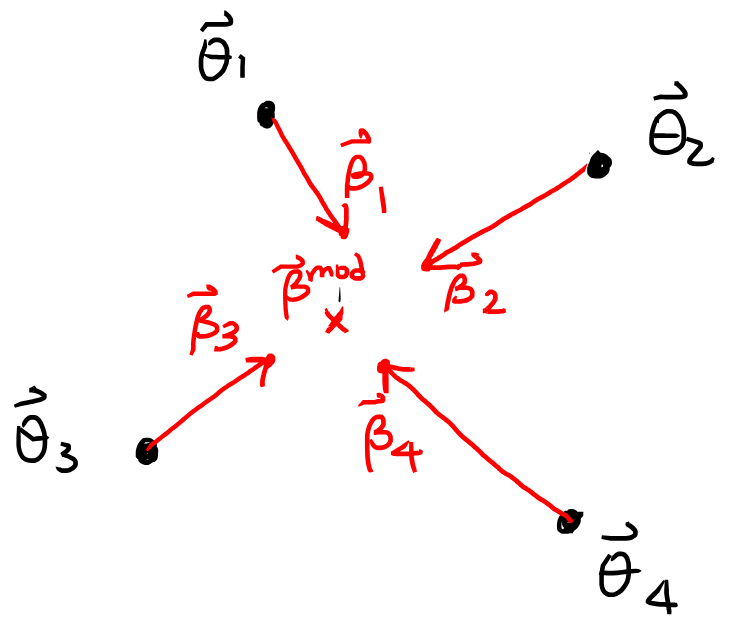
Gravitational lens modelling often requires fitting lens parameters by comparing observed image positions with those predicted by a lens model. One approach is working in the source plane, where each observed image position is mapped back to a position in the source plane using a trial lens model. A good model should map all observed images back to the exact same source location.
When modelling with source plane positions, we search for lens model parameters and a modelled source position that minimise the following :
Where:
- : the inferred source position from the -th image,
- : the modelled source position (often the weighted mean),
- : magnification of image ,
- : positional uncertainty of image on the image plane,
- : number of observed lensed images.
This method is computationally efficient and useful for initial parameter exploration, though it comes with caveats (e.g., over/under-predicting images).
1. Global Parameters
At the top of your config file, define the global settings, establishing chi2type 1 to enable source-plane optimisation.
chi2type        1
minimiser       siman
seed            1

siman_iter      1
siman_nT        1000
siman_dS        10
siman_Sf        1.1
siman_k         2
siman_Ti        10
siman_Tf        1.1
siman_Tmin      1

mcmc_n          100000
mcmc_dS         0.5
mcmc_dSini      0
mcmc_k          2

Rsoft           1e-05
2. Lens Mass Parameters
Under lenses_vary 2, define a two-component lens model consisting of an elliptical power law (epl) and an external shear component.
lenses_vary 2
    epl
    4.000000  #x-coord   flat:3.8,4.2   step:0.1
    4.000000  #y-coord   flat:3.8,4.2   step:0.1
    0.700000  #b/a       flat:0.1,1     step:0.1
    1.500000  #theta     flat:0,6.3     step:0.1
    0.800000  #theta_e   flat:0.5,3  scale:  step:0.1
    1.500000  #gam       flat:0.3,0.7  step:0.1

    shear
    0.070000  #magnitude  flat:0,0.6  step:0.1
    0.800000  #theta      flat:0,6.3  step:0.1
3. Source and Image Positions
Convert the observed quasar image positions from pixel coordinates to arcseconds:
sources 1
    Dds/Ds    1.000000  exact:
    source weighted
    srcx      3.700000  exact:
    srcy      3.700000  exact:
    4
    4.3200000   3.9200000  error:0.04
    5.6000000   4.7200000  error:0.04
    5.1200000   5.6000000  error:0.04
    4.2400000   5.3600000  error:0.04
3a. Source Position Options
GLEE offers four methods to determine the source position from the observed image positions. Specify the option under Dds/Ds:
sources 1
    Dds/Ds    1.000000  exact:
    source OPTION         # ← Choose one: mean | weighted | best | parameter
    srcx      3.700000  exact:
    srcy      3.700000  exact:
| Option | Description | When to Use |
|---|---|---|
mean | Unweighted mean of mapped image positions | Quick initial exploration; all images have similar magnification |
weighted | Mean weighted by magnification | Recommended default — downweights highly magnified (distorted) images |
best | Source position that minimizes | When source position itself is a constraint (e.g., from independent data) |
parameter | Treat srcx, srcy as free parameters | Advanced: when source position has priors or is linked to another source |
:::note Automatic Updates
For mean, weighted, or best, GLEE automatically updates srcx and srcy in the output config file to the computed optimal values.
:::
3b. Positional Uncertainties
Specify observational uncertainties using the error: keyword. GLEE supports both circular and elliptical error regions.
Circular Errors (Isotropic)
For symmetric positional uncertainty:
4.3200000 3.9200000 error:0.04
This represents a 2D Gaussian error circle with arcsec in both x and y directions.
Elliptical Errors (Anisotropic)
For elongated uncertainties (common along arcs):
error:r_major,r_minor,theta
r_major: semi-major axis (arcsec)r_minor: semi-minor axis (arcsec)theta: position angle in radians (CCW from +x axis)
Example: Error ellipse with major axis = 0.10", minor axis = 0.03", oriented 45° from +x:
5.1200000 5.6000000 error:0.10,0.03,0.785
Mathematical Implementation
GLEE computes the image-plane positional for each image using the error matrix formalism. Given an error ellipse error:a,b,theta where , :
-
Define error matrix (in principal axes):
-
Define rotation matrix :
-
Transform to observed frame:
-
Invert to get covariance matrix:
-
Compute chi-squared for image with observed position and predicted position :
:::tip Special Case: When the error ellipse is aligned with the x-axis ():
:::
3c. Flux Constraints (Optional)
If flux measurements are available, constrain the model using magnification (chi2type 4).
Basic Flux Syntax
sources 1
    Dds/Ds    1.000000  exact:
    source weighted
    4
    4.3200000   3.9200000  error:0.04  flux:10.0,2.0
    5.6000000   4.7200000  error:0.04  flux:5.0,1.5
    5.1200000   5.6000000  error:0.04  flux:8.2,1.8
    4.2400000   5.3600000  error:0.04  flux:3.1,0.9
- First value: Observed flux (arbitrary units)
- Second value: Flux uncertainty
Magnification Chi-Squared Formula
where:
- : observed flux of image in system
- : model magnification
- : intrinsic source flux (computed as weighted mean)
- : flux uncertainty
Special Keywords for Flux Modeling
Central images (cusps/folds) can have extreme demagnification (), making source flux estimation numerically unstable. Use the central: flag to exclude them from the intrinsic flux calculation:
4.2400000 5.3600000 error:0.04 flux:0.5,0.2 central:
Non-detections can be modeled as upper limits using fluxlimit::
5.1200000 5.6000000 error:0.04 flux:0.1,0.05 fluxlimit:
This treats the flux value as an upper bound (the uncertainty is ignored).
:::warning Caution with Central Images
Avoid using fluxlimit: on central images when the central mass density could be very high (e.g., supermassive black hole). GLEE may not find the central image, artificially inflating and wrongly rejecting plausible models.
:::
4. Minimisation
Save the above sections in a config file and run a basic simulated annealing (siman):
glee.py minimise -o configfile2 configfile
To compare values before and after:
glee.py chi2 -c src -- configfile       # initial fit
glee.py chi2 -c src -- configfile2      # optimised fit
5. MCMC Optimisation
To sample the parameter space thoroughly, run MCMC on your new file:
glee.py -v 1 mcmc configfile2
This saves accepted iterations as a .mcmc file. Ensure mcmc_dS yields an acceptance ratio of ~0.25.
MCMC / Siman Cycle
Iteratively refine the model:
- Run siman on the config file.
- Run MCMC on the siman result (e.g., 100k iterations).
- Save the best-fit iteration as a new config file.
- Update the config with the new covariance matrix.
- Recalculate .
With this cycle, src_chi2 typically reduces to . Use gleeview.py to verify that all images map back to a tiny central source region.
:::tip Next Step
Once src_chi2 has converged, proceed to Tutorial 2: Image Plane Positions to refine your model using image-plane constraints.
:::
6. Parameter Flags and Options
GLEE provides flexible parameter control through flags and keywords. Understanding these is essential for efficient optimization.
Common Parameter Flags
| Flag | Syntax | Description | Use Case |
|---|---|---|---|
flat: | flat:min,max | Flat (uniform) prior between bounds | Standard optimization with physical bounds |
gauss: | gauss:mean,sigma | Gaussian prior | Incorporate external constraints (e.g., velocity dispersion) |
noprior: | noprior: | No explicit prior (unbounded) | Exploratory runs; use with care |
exact: | exact: | Fixed parameter (not varied) | Hold values constant (e.g., known redshifts) |
log: | log: | Sample in log-space | Parameters spanning orders of magnitude (e.g., core radius) |
step: | step:0.1 | MCMC step size | Tune acceptance rate (~0.25 optimal) |
scale: | scale: | Profile-specific normalization | Convert strength → Einstein radius (profile-dependent) |
label: | label:name | Assign identifier for linking | Enable parameter relationships |
link: | link:name a:a,b,c | Link to labeled parameter | Enforce relationship |
Example: Tuning an EPL Profile
lenses_vary 1
    epl
    4.000000  #x-coord   flat:3.8,4.2   step:0.05  label:lens_x
    4.000000  #y-coord   flat:3.8,4.2   step:0.05  label:lens_y
    0.700000  #b/a       flat:0.5,1.0   step:0.05
    1.500000  #theta     flat:0,6.28    step:0.1
    0.800000  #theta_e   flat:0.5,3.0   scale:  step:0.05
    1.500000  #gam       flat:1.8,2.2   step:0.02  gauss:2.0,0.1
Interpretation:
- x, y coords: Flat prior with tight bounds; labeled for linking to other components
- theta_e: Uses
scale:to interpret value as Einstein radius (not raw normalization) - gam (slope): Gaussian prior centered at 2.0 (isothermal) with
The scale: Keyword
The scale: keyword modifies how profile strength parameters are interpreted:
Without scale:: The parameter is the raw normalization of the convergence.
With scale:: The parameter is the effective Einstein radius .
For PIEMD:
- Without
scale:: directly - With
scale::
:::tip When to Use scale:
Use scale: when you want the parameter to represent a directly measurable quantity (Einstein radius from observed image separation) rather than an abstract normalization.
:::
Parameter Linking
Link parameters between different components using label: and link::
lenses_vary 2
    piemd
    4.000000  #x-coord   flat:3.8,4.2   step:0.05  label:mass_x
    4.000000  #y-coord   flat:3.8,4.2   step:0.05  label:mass_y
    # ... other parameters

    shear
    0.050000  #magnitude  flat:0,0.3     step:0.01
    1.200000  #theta      link:mass_pa   a:0,1,1   # same PA as PIEMD
The link: syntax: link:label_name a:offset,multiply,exponent
Example: link:lens_x a:0.1,1,1 → Offset by +0.1 arcsec from labeled lens_x
7. Convergence Diagnostics
Assessing Source-Plane Fit Quality
After MCMC, check if the model has converged:
glee.py chi2 -c src -- configfile_mcmc_best
Good convergence indicators:
- (for sanity check)
- All images map to a compact source region (verify with
gleeview.py)
Poor convergence indicators:
- → Model cannot map images to common source
- MCMC acceptance rate → Step sizes too large (reduce
mcmc_dS) - MCMC acceptance rate → Step sizes too small (increase
mcmc_dS)
Covariance Matrix Analysis
After MCMC, generate a covariance matrix to assess parameter degeneracies:
glee.py covar -H 10000 configfile.mcmc
-H 10000: Burn-in (discard first 10,000 accepted samples)- Outputs:
configfile.cov(covariance matrix file)
Using the covariance:
mcmc_n          100000
mcmc_dS         0.5
mcmc_dSini      0
mcmc_k          2
sampling_cov    configfile.cov   # ← Use covariance for efficient sampling
This enables adaptive MCMC using the covariance structure, improving mixing and convergence.
When to Move to Image Plane
Source-plane modeling has known limitations:
- Can over/under-predict the number of images
- Positional uncertainties propagate through magnification factor
- Not robust for complex mass distributions
Transition to Tutorial 2 when:
- has plateaued (no longer improving)
- You've iterated siman → MCMC → covar → MCMC at least 2-3 times
- You're ready for a more physically robust constraint (image-plane positions)
:::tip Best Practice Use source-plane modeling to get initial parameter estimates and a rough covariance matrix, then switch to image-plane fitting for the final model. :::